Introducktion
Every now and then, I spark a debate in a whatsapp group, this is one issue that currently bothers me.
HTTPRoute — Is That Just a Glorified Load Balancer?
If you’ve followed my earlier articles, like Part 1: Linkerd + Deployment Strategy — Canary, you’ll know how this whole adventure started: a lively debate in a WhatsApp group full of sharp DevOps and SRE folks. Naturally, I decided to roll up my sleeves and document exactly how these deployment strategies work, using Linkerd running on Minikube.
So far, things have been moving along nicely, I’ve got the basics down, and most of the pieces fit… but there’s one part that’s been giving me a headache. And that part is the HTTPRoute resource.
I’ve found myself asking: Is HTTPRoute really doing what it promises? Or is it just a fancy, over‑hyped version of a regular load balancer?
What Exactly Is HTTPRoute?
Actually, I had explained it NICELY, under the section OR heading - The Magic of Version Switching in the artcle Part 1: Linkerd + Deployment Strategy — Canary. However, let’s see if I can put it in plain English.
In Kubernetes, HTTPRoute is part of the Gateway API — think of it as a set of traffic rules written in YAML that tells your cluster:
“When someone sends a request to this address, where should it go, and how should it be split between different versions of my app?”
But to put it simply:
- A Load Balancer usually just spreads traffic evenly across healthy servers.
- HTTPRoute goes further — it lets you control how much traffic goes where, using rules and weights.
This is exactly what makes it useful for deployment strategies:
- ✅ Canary Deployment: Send, say, 90% of traffic to the stable version and 10% to the new version.
- ✅ Blue‑Green Deployment: Shift all traffic at once — 100% to the new version, 0% to the old one, or switch back instantly if needed.
In theory, this is perfect. In practice? Well… that’s where things got interesting.
The Setup — Looks Right on Paper
I’ve already documented both strategies in separate posts:
📘 Canary Deployment: Linkerd + Canary Setup
📗 Blue‑Green Deployment: Linkerd + Blue‑Green Setup
In each case, I configured my HTTPRoute exactly as per the specs:
- For Canary: Set weights to 90 for stable, 10 for new.
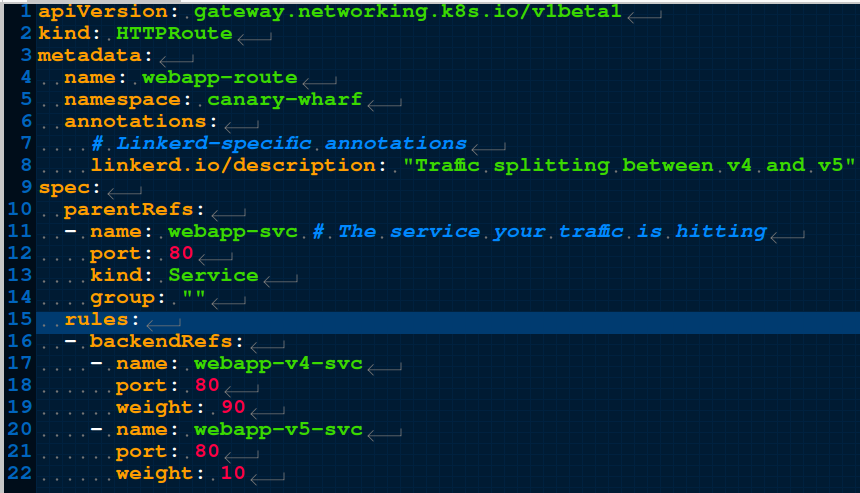
- For Blue‑Green: Set weights to 100 for Blue, 0 for Green — or vice versa.
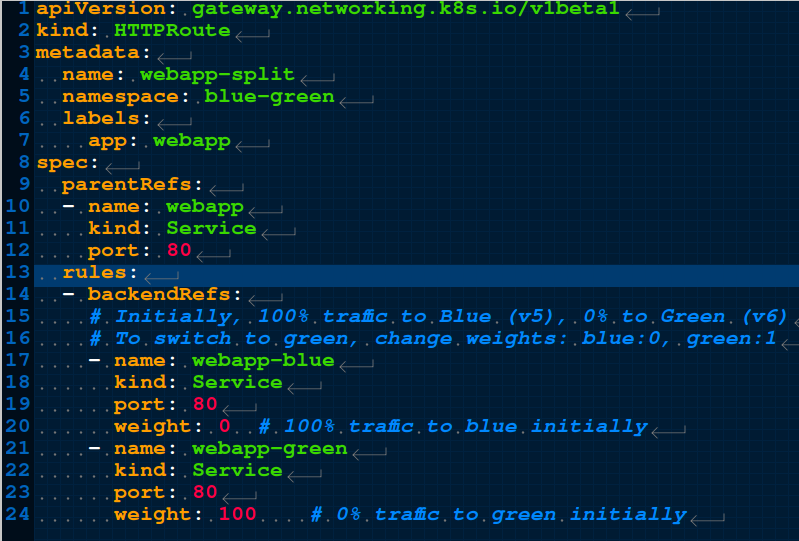
Everything looked correct in the YAML. The deployments were up, the services were running, Linkerd was happily meshing them… but when I tested?
The Reality Check — Where Did the Numbers Go?
My first test was the “manual method”: refresh the browser, count which version shows up. With a 90/10 split, I expected roughly 9 out of 10 requests to hit the stable version, and only 1 to land on the new one. What I actually saw? Almost 50/50.
I almost saw 50% traffic of the stable version - v4
 And 50% traffic of the canary version - v5
 Same result when I flipped to Blue‑Green — even when I set one side to 100% and the other to 0%, traffic was still splitting almost evenly.
“Hmm… maybe I’m just counting wrong?” I thought. Clicking refresh isn’t exactly scientific.
Same result when I flipped to Blue‑Green — even when I set one side to 100% and the other to 0%, traffic was still splitting almost evenly.
“Hmm… maybe I’m just counting wrong?” I thought. Clicking refresh isn’t exactly scientific.
So I did what any good engineer does: I automated it.
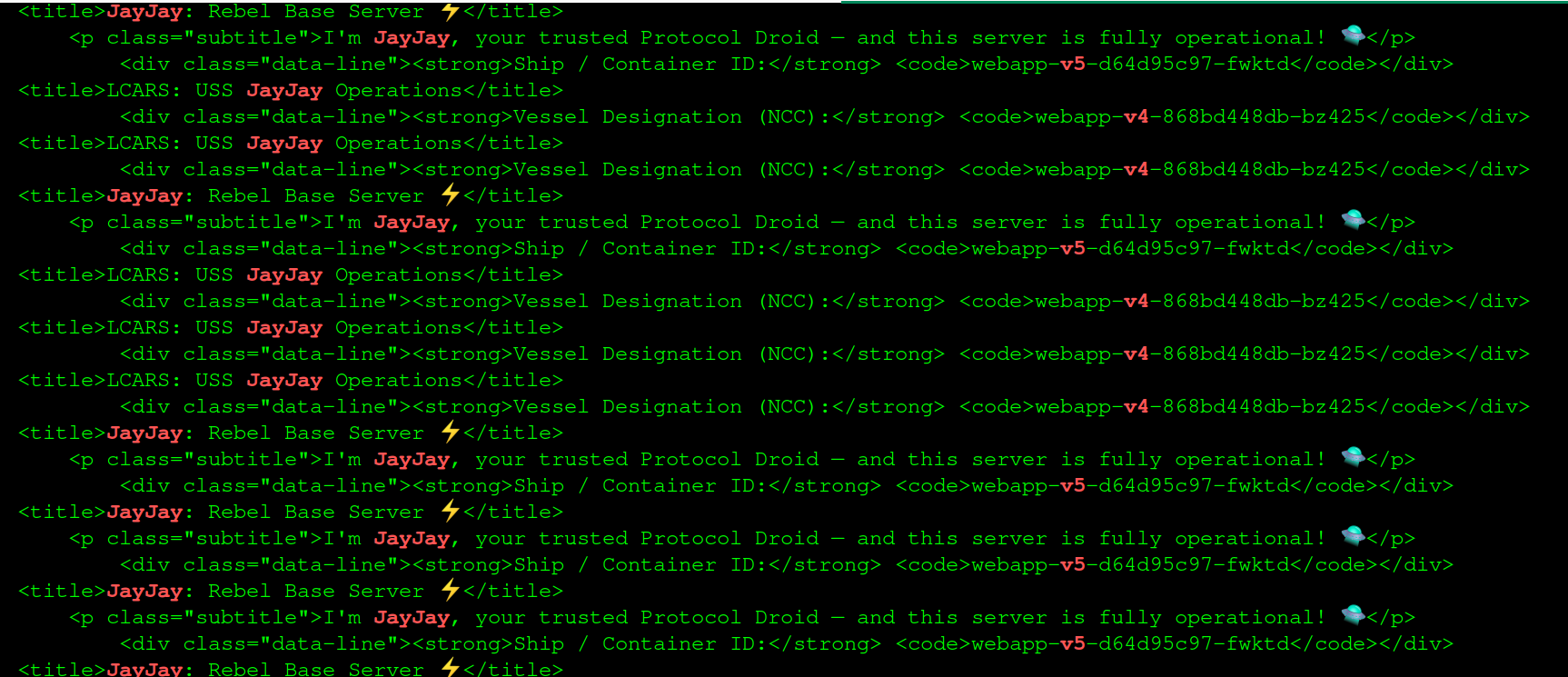
I pulled out my almighty curl command, (It was getting a bit dusty anyway). I decided to run a curl against the hostname of the ingress and then grep for specific keywords in my case the name of each deployment file, because
WebApps the test app I was using creates Pods and names them after the deployment name. So greping for part of the deployment yeilds a result. And I just put that in a while loop.
while true; \
do \
  curl -s http://maltina.app1 | grep -E "v4|v5|Hello|JayJay"; \
  sleep 0.5; \
done
And from the screenshots below, the tag v4 appears almost as much as v5. And thats during the testing of carnary deployment
Time to bring in the Big Guns — Test Scripts
I wrote a simple Bash script called test-counter.sh ( I mean, I AI enhanced a bash script - who writes scripts from scratch these days LOL) just to automate the process and take the repetition out of it. And It works like this:
It accepts three inputs:
- The target hostname/ingress address
- The identifier for the stable/Blue version
- The identifier for the new/Green/Canary version
See 🖼️ Screenshots

Then it runs:
- Repeated curl requests to the service
- Checks the response to see which version answered
- Keeps a running tally
- Calculates the percentage split after every run
The result? Same story.
🖼️ This is a Screenshot when running the script for a while.
 🖼️ This is the Screenshot of the summary afterwards.
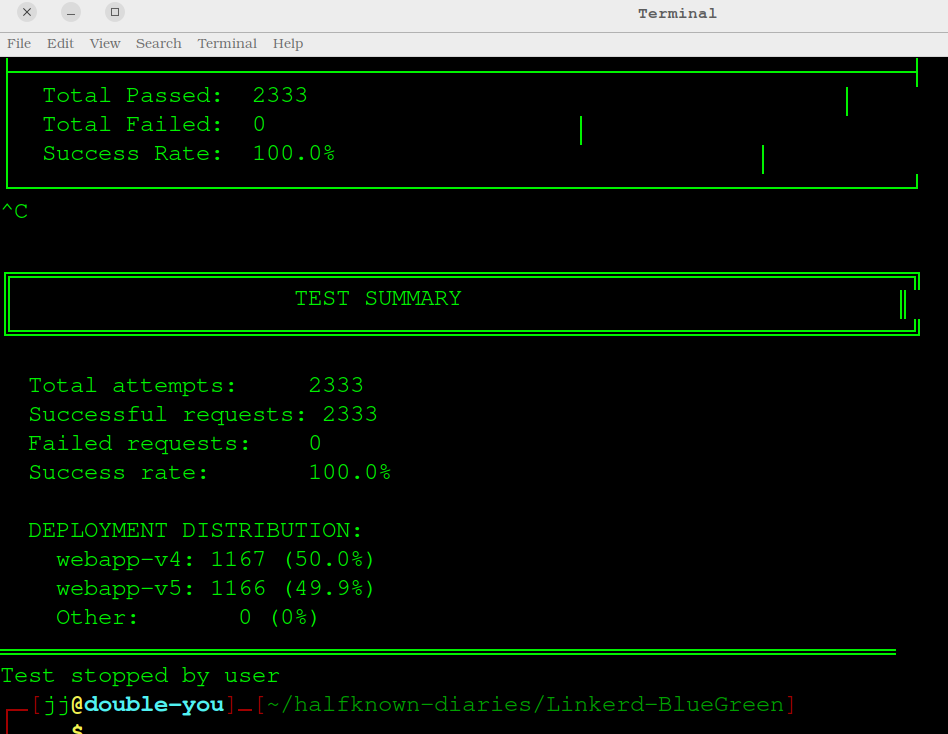
No matter how long I ran it — 10 requests, 100, or even 1,000 — the traffic stubbornly stayed around 50/50. Even when I explicitly told it to send zero traffic to one version, it still got roughly half.
So… Is It Just a Glorified Load Balancer?
This brings me back to my original question.
If HTTPRoute is supposed to respect weights and split traffic precisely, but instead behaves like a basic round‑robin balancer — just sending requests evenly no matter what I write in the rules — then what’s the point?
Is it really doing what it claims, or is there something I’m missing in how it works with Linkerd, Minikube, or the Gateway API itself?
At this stage, I’m not calling it broken — I’m calling it mysterious. And that’s exactly why I’m writing this: to document the confusion, share what I’ve observed, and hopefully figure out what’s going on under the hood. You can see the exact configuration files, test scripts, and screenshots of the results below — and if you’ve run into this same behaviour, I’d love to hear your thoughts!
🔗 All Code Relating to this topic can be found at this GitHub Repository